
Download WhatsApp on Iphones & Androids
What you will learn
Learn how to find and download an App
The App we are going to use is called WhatsApp – great for sending messages, photos, videos and can make audio calls
You can use on Android phone or iPhone (or tablets)
Download WHATSAPP
iphones
There are millions of Apps for iPhone, iPads and the Apple Watch. Many are suitable for iPhones.
This guide is written using iPhone 7, running iOS 10.3 – the process is similar for all iOS devices.
You need an Apple account to even access the free Apps.
There will be an icon on your iPhone or iPad.
Remember data download costs money, so make sure you have a connection to wifi.
There are many of Apps – you can use the ‘search’ facility to find WhatsApp.
For detailed steps to download whatsapp on your mobile device click here
android
You can choose free Apps, or paid Apps using the Google play store, accessed from your phone. Downloading any apps will use data allowance, so monitor (or use a wifi area)
1.Open PlayStore (find the icon on your phone). Sign into your Google Account first
2.There will be a list of topics for you to choose from, for example, News, Games, Music and Apps
3.Choose Apps
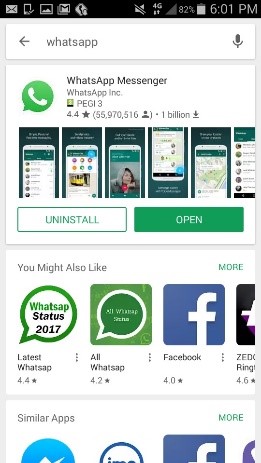
4.Find the App – WhatsApp (it is free).
5.Tap the screen to choose it. Tap on the install button – it may ask you permission to continue, tap Accept
6.You are done
For more detailed steps on how to do it click here
iphones
Step 1
Open your iPhone’s Image titled  App Store. Tap the App Store app icon, which resembles a white “A” on a light-blue background.

Step 2
Tap Search. This tab is in the bottom-right corner of the screen.

Step 3
Tap the search bar. It’s the “App Store” text field at the top of the screen. Your iPhone’s on-screen keyboard will appear.

Step 4
Search for WhatsApp. Type in whatsapp and then tap the blue Search button in the lower-right corner of the keyboard.

Step 5
Tap GET. It’s to the right of the “WhatsApp Messenger” heading near the middle of the screen. If you’ve previously downloaded WhatsApp, you’ll see a cloud-shaped “Download”

icon here instead.

Step 6
Scan your Touch ID fingerprint when prompted. This will prompt the WhatsApp app to begin downloading onto your iPhone.
- If you don’t have Touch ID or it isn’t set up for the App Store, you’ll instead tap Install at the bottom of the screen and then enter your Apple ID password when prompted.
- Skip this step if WhatsApp begins downloading automatically.

Step 7
Wait for WhatsApp to finish downloading. WhatsApp should only take a few seconds to download on most Wi-Fi or LTE connections. Once WhatsApp finishes downloading, you’re free to set up WhatsApp.
- If you want to open WhatsApp to begin setting it up immediately after downloading it, you can tap OPEN to the right of the “WhatsApp Messenger” heading.

androids
Step 1
Go to the app or play store on your phone . Type ‘WhatsApp’ into the search bar. This will bring up the WhatsApp Messenger app, which is free to download.