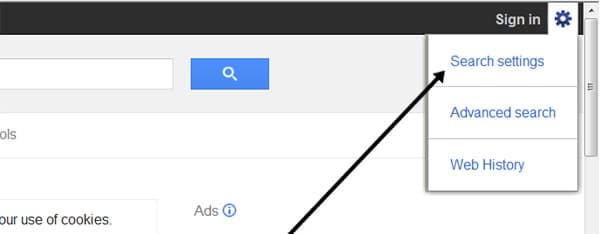

Google – searching
What you will learn
- Learn how to search the internet to find the specific information that you want
- Restrict the searching to specific countries and/or languages
- Learn about ‘keywords’ – search terms
- Search using a PC, tablet, smartphone
How to search the internet?
There are literally billions of websites available across the internet, all available for you to search. You need a ‘browser’ (Chrome or Internet Explorer are common) and a ‘search engine’ to enable you to find exactly what you want.
Example from a PC (just click on the Google Chrome icon) 
It seems a bit daunting at first, but you soon get used to searching (or googling).
 In simple terms, Google crawls around the internet, and creates indexes of all the keywords contained in documents, on websites. You have to use ‘keywords’ to retrieve the information you want – this is searching.
So part of the art of searching is choosing the correct keywords; sometime you start with one or two and you realise you need to change them to get the results you want. Google lets you perform advanced searches also, where you can choose what country, what language you wish to look at.
You can search using a computer, a tablet, a smartphone. You don’t have to use Google, there are others; for example, on an iPhone, safari is available.
What is Google?
Google can be used to find a variety of information such as websites, pictures (images), maps or even the answer to the crossword clue that has been driving you crazy all morning.
So if you type the work ‘holidays’ into the search box for instance, Google will show you all the websites with holiday information. You’ll soon learn that you need to be more specific with the words you use, as Google will find millions of websites if you just type in ‘holidays’.
Googles key benefits:
1.Simple search box for you to type your query
2.Answers are provided almost instantly
3.You can choose to search for websites, images, news, maps and much more
4.You can search just in UK or all over the world
5.Google has produced its own web browser – this is called Google Chrome. You might also choose to use Internet Explorer.

Step 2
Type in words that are relevant to what you’re looking for – that is, keywords. In this case, you’re looking for a holiday in France so your keywords would naturally be ‘holiday’ and ‘France’.


Step 3
There are still far too many results to go through, so your search terms need to be more precise.

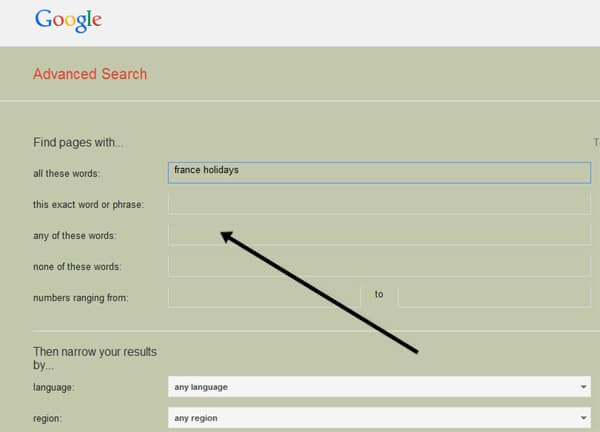

Step 4
This advanced search produces 1,920,000 results to consider – still a lot to go through. The best way to reduce these further is to be even more exact – in this case, to consider where in France you want to go rather than specifying the whole country. Say you want to go to Provence: type this into the search box after ‘France’, being sure to keep all the other keywords and exclusions. Then click Search again.
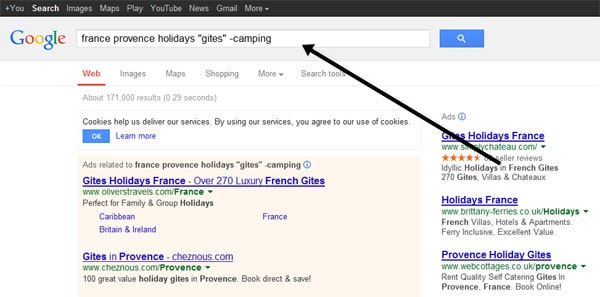
Step 5
As you can see, this has now given a result of just under 6 million websites: still quite a lot but Google will often sort them in the order of their relevance to your query, so the ones at the top are more likely to match what you’ve asked for.